
Ask a sales rep to log a call in the CRM and they will, mostly. Ask them to log it with the number they dialled, the duration, a link to the recording, and a two-line summary of what was agreed, and you get maybe forty per cent compliance on a good week. The other sixty per cent lives in someone’s head, or in Aircall, or in a Teams message that scrolled away.
That gap is not a discipline problem. It’s a plumbing problem.
We recently built an Aircall Bitrix24 Integration for a team running the phone system in one tab and the CRM in another, retyping the same information into both. The brief was simple to state and considerably less simple to deliver: every call, every SMS, every recording and AI summary should land on the right CRM record automatically, without anyone clicking anything.
Here’s how it works, what we learned building it, and the one compliance question Australian teams need to answer before they switch recording sync on.
The core problem: two systems, no shared identity
Bitrix24 and Aircall both know about your customers. Neither knows what the other calls them.
Aircall thinks in phone numbers and agent accounts. Bitrix24 thinks in leads, contacts, deals and user IDs. Before you can log a single call, you have to solve two matching problems.
Matching the customer. An inbound call arrives from +61 4xx xxx xxx. Bitrix24 exposes telephony.externalcall.searchCrmEntities, which searches phone fields across leads, contacts and companies and returns whatever it finds. A practical Australian wrinkle here: your CRM almost certainly holds the same mobile number in three formats — 0412 345 678, +61412345678, and 61 412 345 678 — because it was imported from three different places. Normalise to E.164 on the way in and on the way out, or the search silently returns nothing and you start creating duplicate leads for customers you already have. Same applies to landlines with area codes (02, 03, 07, 08) and to 1300/1800 inbound numbers.
Matching the agent. This one bites people. Aircall sends you an agent identified by an Aircall user ID that means nothing to Bitrix24. Hardcoding a mapping table works until someone joins, leaves, or changes desks. We built dynamic matching instead: the handler resolves the Aircall agent to a Bitrix24 user by email first, then falls back to phone number if the email doesn’t resolve. New rep onboarded in both systems with the same work email? The integration picks them up with no configuration change. That single design choice has saved more support tickets than any other part of the build — and it matters more than you’d think for distributed teams working across AEST, ACST and AWST.
Click-to-call, and the register/finish lifecycle
Outbound starts in Bitrix24. A rep clicks the phone icon on a lead, and a PHP handler — registered as a local server application inside Bitrix24 — picks that up and fires the call through the Aircall API to the rep’s connected softphone or desk device.
What matters is what happens next. Bitrix24’s telephony API works in a lifecycle: you register a call when it starts, which returns a CALL_ID, then you finish that call with the outcome, duration and status. The temptation is to skip registration and just write a completed activity when the call ends. Don’t. Registering up front is what gives you a live call card in Bitrix24 and, more importantly, a stable ID to attach everything else to later.
Because “later” is the whole trick with this integration.
The post-call trickle
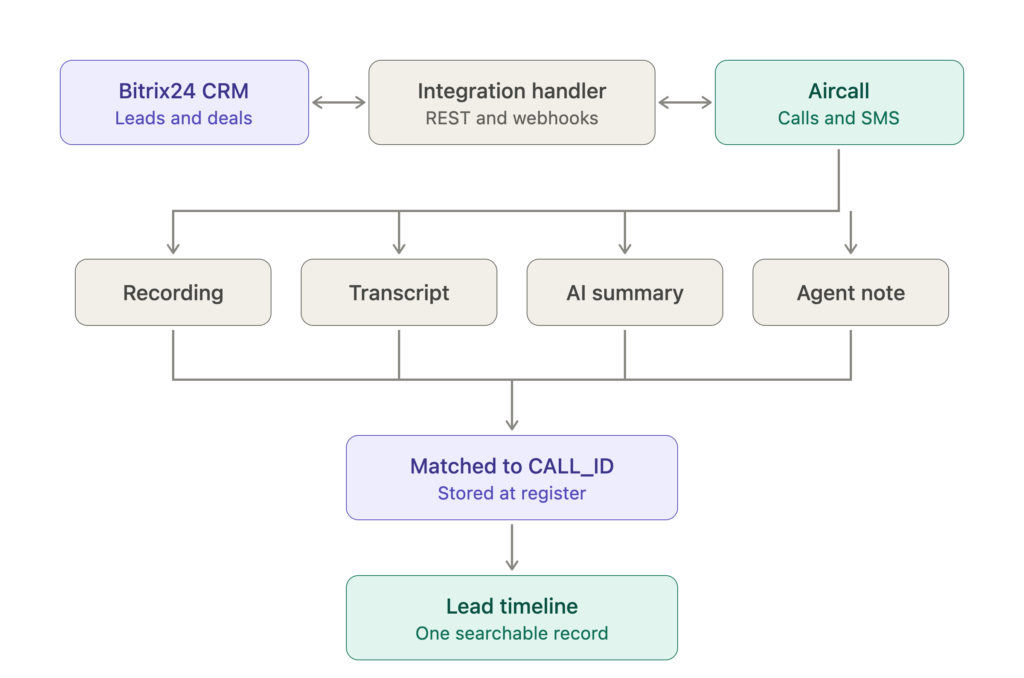
A call doesn’t finish when the call finishes. Aircall keeps sending you things for the next several minutes:
- The recording becomes available, usually within seconds
- The transcription lands after processing
- The AI summary arrives after that
- The rep might add a note in Aircall ten minutes later, after they’ve finished writing their follow-up email
Four separate webhook events, arriving out of order, all belonging to one call that Bitrix24 already considers closed.
This is the part that breaks naive implementations. If you treat each webhook as a standalone event, you end up with four disconnected timeline entries and a rep who has to piece the story together. The fix is to persist the Aircall call ID against the Bitrix24 CALL_ID at registration time, so every late-arriving artefact can find its way home. The recording attaches natively via telephony.externalcall.attachRecord, so it plays inline in the Bitrix24 call log rather than sitting behind an external link. Transcript, AI summary and notes append to the CRM timeline on the same entity.
The result: a rep opens a lead three weeks later and sees the call, hears the recording, reads what was said and what was agreed. No tab-switching, no hunting.
The Australian compliance question nobody asks until later
Here is where Australian teams need to stop and think, because syncing recordings into a CRM changes the compliance picture — and most integration write-ups skip this entirely.
Australia has no single national rule on call recording consent. It’s governed by a patchwork of state and territory surveillance and listening device legislation sitting under federal law, and the positions genuinely differ. New South Wales is highly restrictive. Victoria, Queensland and the Northern Territory are more permissive about recording a conversation you’re a party to, though with restrictions on sharing. South Australia, Western Australia, Tasmania and the ACT generally expect all-party consent.
If you take calls from customers nationally — and most businesses do — the workable approach is to operate to the strictest standard you’re likely to encounter rather than gambling on where the caller happened to be sitting. In practice that means a clear pre-call announcement stating that the call is being recorded and why, plus a genuine alternative for anyone who doesn’t want to be recorded.
The second half matters just as much once the integration exists. A recording that contains information about an identifiable person is personal information under the Privacy Act 1988 (Cth), which means the Australian Privacy Principles govern how you store, secure, access and eventually dispose of it. Push that recording into your CRM and you have just widened the circle of people who can hear it. So:
- Restrict access. Not everyone with a Bitrix24 login needs to play back customer calls. Set permissions deliberately.
- Decide retention up front. Recordings shouldn’t accumulate indefinitely by default. Sector rules may set minimums — financial services in particular — so check what applies to you.
- Update your privacy policy to reflect that recordings, transcripts and AI-generated summaries are collected and stored in the CRM.
- Treat transcripts and AI summaries as the same class of data as the audio. They’re derived from it and often contain more searchable personal information than the recording itself.
None of this is a reason not to build the integration. It’s a reason to configure it deliberately, and to have the conversation with whoever owns privacy in your business before go-live rather than after. This is general information rather than legal advice — worth a short conversation with your own adviser if you’re in a regulated sector.
SMS in both directions
Calls are the obvious half. Messages are the half that usually gets dropped.
Inbound SMS syncs to the timeline the same way calls do — match the number, find or create the entity, write the message. Outbound is more interesting, because we registered a Bitrix24 SMS provider handler via the message service API. That means Aircall shows up as a native sending option inside Bitrix24. Reps send from the CRM interface they already use; the message goes out over Aircall; the sent message writes back to the timeline automatically. Nobody has to be told to use a new tool, which is the only reliable way to get adoption.
Worth noting for Australian senders: SMS marketing here sits under the Spam Act, so consent and a working opt-out apply to any promotional messaging you push through this channel. Operational and transactional messages to an existing customer are a different matter, but the distinction is worth being clear on before you automate anything at volume.
Unknown numbers: create the lead
When a call or SMS arrives from a number the CRM has never seen, you can log it against nothing, or you can create a lead. We create the lead — populated with the number, the channel, the timestamp and the call artefacts attached to it from the moment it exists.
This is opinionated, and it’s worth being honest about the trade-off: you will generate some junk records. Wrong numbers, couriers, the occasional scam call. Our view is that a slightly messy lead list is a far cheaper problem than an invisible inbound enquiry. A lead you can merge or delete in two clicks beats a conversation that never made it into the system. Set up a filter or a low-priority stage for auto-created leads and let the reps triage.
What actually changed
The measurable outcome was less manual data entry, but that undersells it. The real change is that “what’s happened with this account?” became a question you answer by looking, not by asking.
Support picks up a ticket and sees the sales call from last Tuesday. A manager reviews a stalled deal and reads the AI summary instead of scheduling a catch-up. Someone searches a phone number and finds every interaction across both channels, in order, with audio.
That’s the point of a CRM. Most of them just never get fed properly.
Thinking about this for your own stack?
If your team runs Aircall alongside Bitrix24 and is still logging calls by hand, the integration work is well-trodden — the API surface on both sides supports everything described here. The design decisions are where projects succeed or stall: how you match users, how you normalise Australian number formats, how you handle late-arriving artefacts, what you do with unknown numbers, and how you handle recording consent and retention.
We build these end to end as a Bitrix24 Gold Partner, for teams across Sydney, Melbourne, Brisbane, Perth and further afield. If you’d like to talk through what it would take for your setup, get in touch and we’ll map it against your current workflow.